10 Best Cold Email Software in 2026, Compared by Real Cost
Best cold email software in 2026: 10 tools compared on what 5,000 and 25,000 emails a month really cost, with prices checked on each pricing page.


This guide ranks the best cold email software of 2026 by what it really costs to send 5,000 and 25,000 emails a month, with warmup, mailboxes and seats counted.
Disclosure: we make Alien Mail, which is on this list. Every other price comes from the tool's own pricing page, and we say where a competitor costs less.
The short answer: For uneven or low volume, Alien Mail is cheapest because you pay per email: 5,000 emails cost $12. For a steady 25,000+ emails a month, flat plans win: lemlist Email is $69 for up to 50,000 emails, and Instantly Hypergrowth is $97. Smartlead ($39) and Saleshandy ($41) are the cheapest monthly plans, and Apollo is the pick if you need a lead database.
The 10 best cold email tools at a glance
Tool | Best for | Pricing model | Starts at | Emails on entry plan | Warmup | Free trial |
|---|---|---|---|---|---|---|
Uneven volume, no monthly fee | Per email (credits) | 100 free credits, then from $5 | Pay as you send | Free, every inbox | 100 free credits | |
High steady volume | Monthly plan | $47 | 5,000 | Included | No card needed | |
Agencies, many mailboxes | Monthly plan | $39 | 6,000 | Pool included; premium extra | Free, no card | |
Solo senders on a budget | Monthly plan | $41 | 6,000 | Included | 7 days | |
25,000 to 50,000 emails a month | Monthly plan (Email) | $69 | 50,000 | lemwarm included | 14 days | |
Teams with many users | Monthly plan | $49 | 5,000 | Free via Mailflow | 14 days | |
Email plus calls and LinkedIn | By active contacts | $59 | 1,000 active contacts | Included | 14 days | |
One user, simple sequences | Per user | $29 per user | 1,500 sends | Included | None | |
Finding and emailing leads in one tool | Monthly plan | $39 | 5,000 recipients | 3 mailboxes on Starter | Free plan | |
A built-in B2B lead database | Per user | Free plan; paid prices not shown | Not stated | Not stated on its pricing page | Free plan |
Monthly billing, checked 2 Nov 2026. Woodpecker is covered below the top 10 because its prices didn't load.
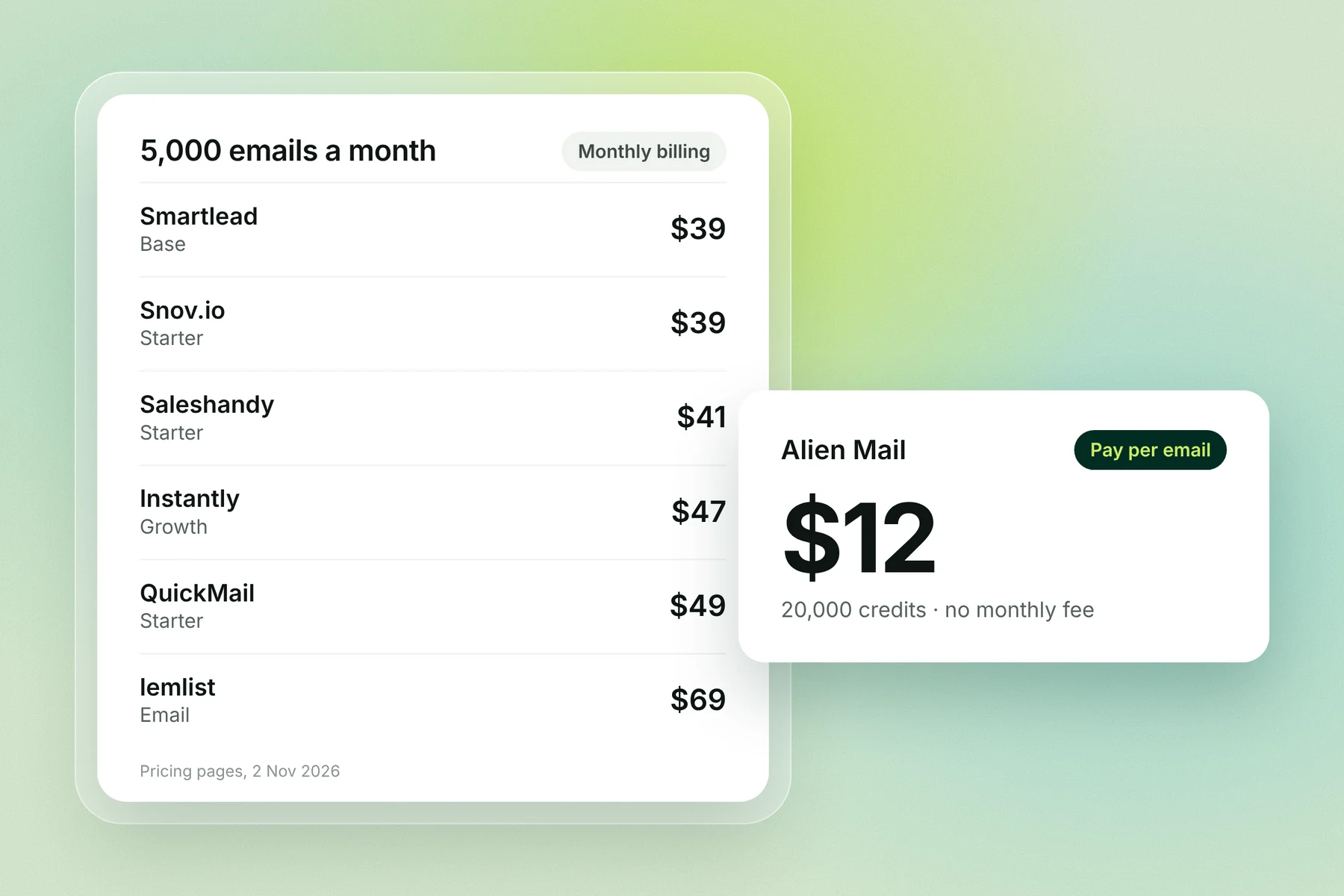
What each tool costs at 5,000 and 25,000 emails a month
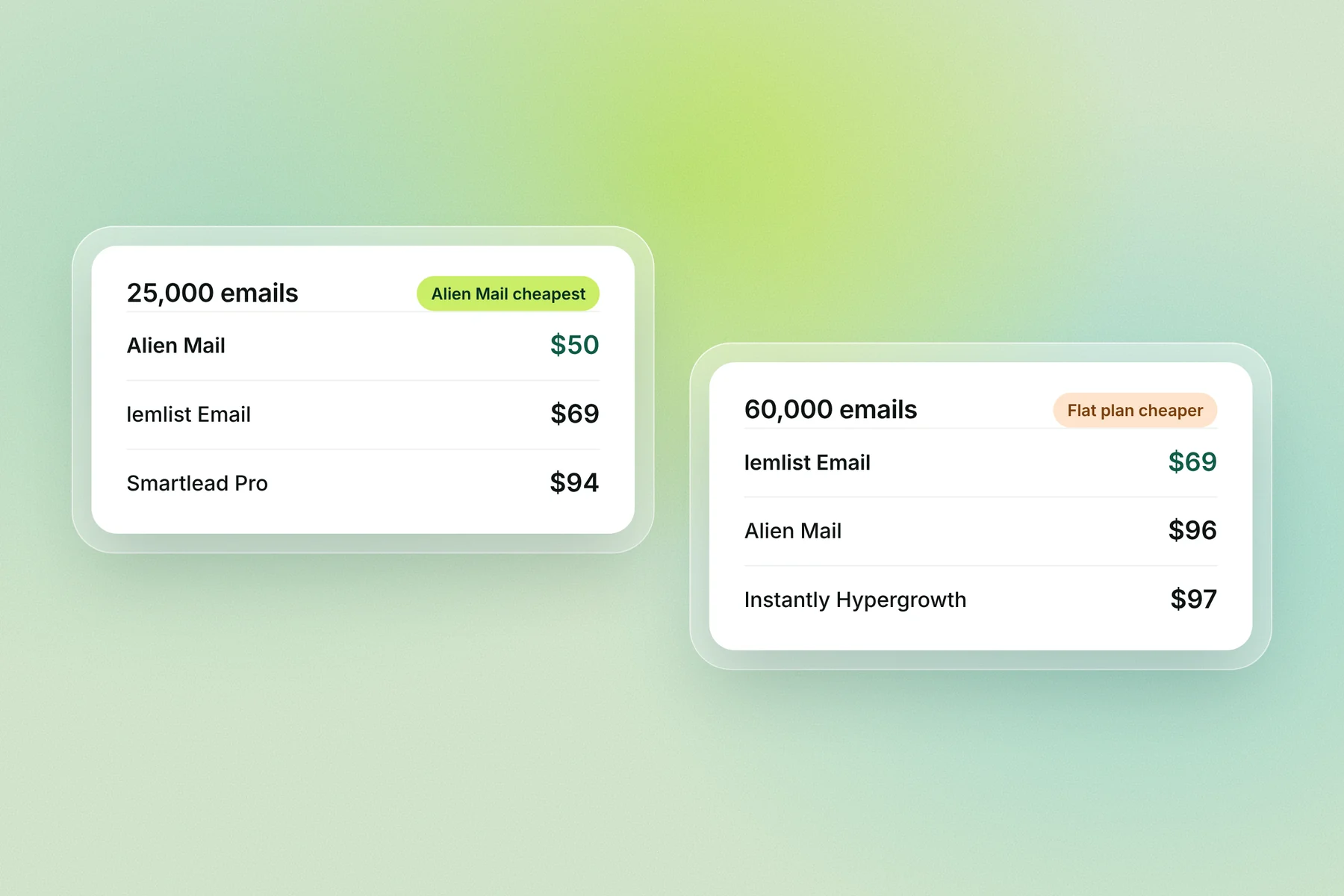
At 5,000 emails a month Alien Mail costs $12 and the cheapest flat plan costs $39. At 25,000 the gap closes: Alien Mail is $50 and lemlist is $69, and above about 43,000 emails a month lemlist's flat $69 is cheaper.
Tool | 5,000 emails a month | 25,000 emails a month |
|---|---|---|
Alien Mail | $12 | $50 |
Smartlead | $39 (Base) | $94 (Pro) |
Snov.io | $39 (Starter, 5,000 recipients) | Higher plans cost more |
Saleshandy | $41 (Starter) | $99 (Pro) |
Instantly | $47 (Growth, up to 1,000 contacts) | $97 (Hypergrowth) |
QuickMail | $49 (Starter) | $99 (Growth) |
Mailshake | $49 per user (Email Outreach; Starter stops at 1,500) | $49 per user, but only 2 addresses per user |
Reply.io | $59 (1,000 active contacts at 5 emails each) | Depends on active contacts |
lemlist | $69 (Email) | $69 (Email) |
Alien Mail: 4 credits per email, cheapest top-up that covers the month (5,000 emails = 20,000 credits = $12; 25,000 = 100,000 credits = $50).
A note on Mailshake at 25,000: its Email Outreach plan lists unlimited sends for $49 per user, but each user gets 2 email addresses. 25,000 emails from 2 addresses is about 600 a day each, far above what most deliverability guidance treats as safe, so plan on more users.
Flat plan or pay per email?
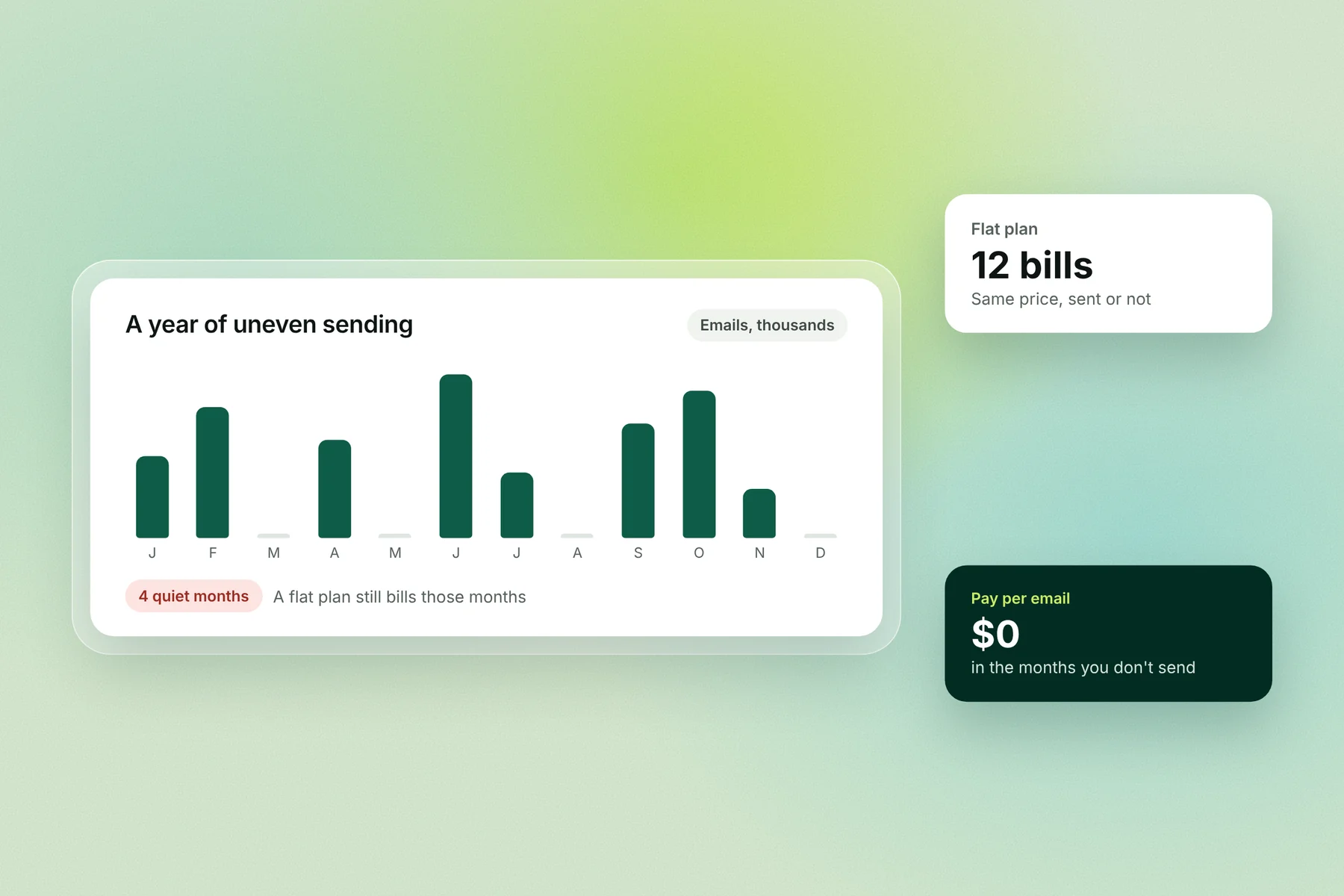
A flat plan charges the same every month, whether you send or not. Pay per email charges only for what you send, so a quiet month costs $0. If your volume swings, or you send under about 40,000 emails a month, pay per email usually costs less; if you send the same high volume every month, a flat plan does.
The 10 best cold email software in detail
1. Alien Mail: best for uneven volume and no monthly fee
Alien Mail charges per email instead of per month: each email uses 4 credits, and credits start at $5. Its AI learns your business, writes the sequence and sets up warmup and send times. Warmup, connected mailboxes and team seats are free.
Price: 5,000 emails $12; 25,000 emails $50; from about $1.20 per 1,000 emails at the top tier
Best for: founders and agencies whose volume changes month to month
Watch out for: above about 43,000 emails every month, lemlist's flat $69 costs less; Alien Mail has no lead database, so you bring your own list
2. Instantly: best for high, steady volume
Instantly's Growth plan is $47 a month for 1,000 uploaded contacts and 5,000 emails; Hypergrowth is $97 for 25,000 contacts and 125,000 emails on its plan card (its comparison table says 100,000). Warmup is included and mailboxes are unlimited.
Best for: teams sending 60,000+ emails every month
Watch out for: the 1,000-contact cap on Growth; the lead database is a separate subscription
3. Smartlead: best for agencies with many mailboxes
Smartlead's Base plan is $39 a month for 2,000 contacts and 6,000 emails, with unlimited mailboxes on every plan. Pro is $94 (90,000 emails) and Unlimited Smart $174 (150,000). Client workspaces start on Pro, at $29 a month each for white label.
Best for: agencies running many clients and mailboxes
Watch out for: premium warmup is sold separately
4. Saleshandy: best for solo senders on a budget
Saleshandy Starter is $41 a month ($34 billed yearly) for 2,000 active prospects and 6,000 emails, with unlimited email accounts and warmup. Starter has 1 user; Pro ($99) has 10 users and 100,000 emails.
Best for: one person who wants a low fixed price
Watch out for: 1 seat on Starter, and the daily warmup limit depends on your plan
5. lemlist: best for 25,000 to 50,000 emails a month
lemlist's Email plan is $69 a month ($55 yearly) for 50,000 emails, with unlimited contacts, senders and users, and lemwarm warmup included. Multichannel, with LinkedIn, is $109 per user.
Best for: steady senders in the 25,000 to 50,000 range
Watch out for: below about 43,000 emails a month, pay per email costs less; Multichannel is priced per user
6. QuickMail: best for teams with many users
QuickMail Starter is $49 a month for 1,000 contacts and 5,000 emails, with unlimited senders and users. Growth is $99 (100,000 emails) and Agency $299 (500,000, 2 workspaces). Warmup runs free through Mailflow.
Best for: teams that want every rep in one account at no extra cost
Watch out for: yearly prices aren't listed
7. Reply.io: best for email plus calls and LinkedIn
Reply.io prices email by active contacts: $59 a month ($49 yearly) for 1,000 active contacts, with unlimited mailboxes under fair use and warmup on every mailbox. Higher contact tiers cost more.
Best for: teams that want email, calls and LinkedIn in one place
Watch out for: price rises with contacts, not emails
8. Mailshake: best for one user with simple sequences
Mailshake Starter is $29 per user a month ($25 yearly) for 1 email address and 1,500 sends. Email Outreach is $49 per user for 2 addresses and unlimited sends. There's no free plan and no trial; payment is up front.
Best for: a single sender who wants a simple tool
Watch out for: per-user pricing adds up for teams
9. Snov.io: best for finding and emailing leads in one tool
Snov.io Starter is $39 a month ($29.25 yearly) for 1,000 finder credits and 5,000 recipients, with unlimited team seats and warmup for 3 mailboxes. Its free Trial plan includes a one-time 450 warmup emails.
Best for: small teams that also need an email finder
Watch out for: limits count recipients, not emails
10. Apollo: best for a built-in B2B lead database
Apollo has a free plan with no time limit (Gmail accounts only) and paid Basic, Professional and Custom plans priced per user with pooled credits. Check its pricing page for current paid prices.
Best for: teams that need to find leads and email them in one tool
Watch out for: credits don't roll over; per-user pricing
Also worth a look: Woodpecker
Woodpecker prices plans by emails sent, from 5,000 a month, with unlimited email accounts and team members and 3 warmups included. Its trial is 14 days or 500 cold emails, whichever comes first. Check its pricing page for current prices. Alien Mail vs Woodpecker
Which cold email software should you choose?
Start with how much you send and how steady it is, then check what's included. Most of the cost difference between these tools comes from the pricing model, not the features.
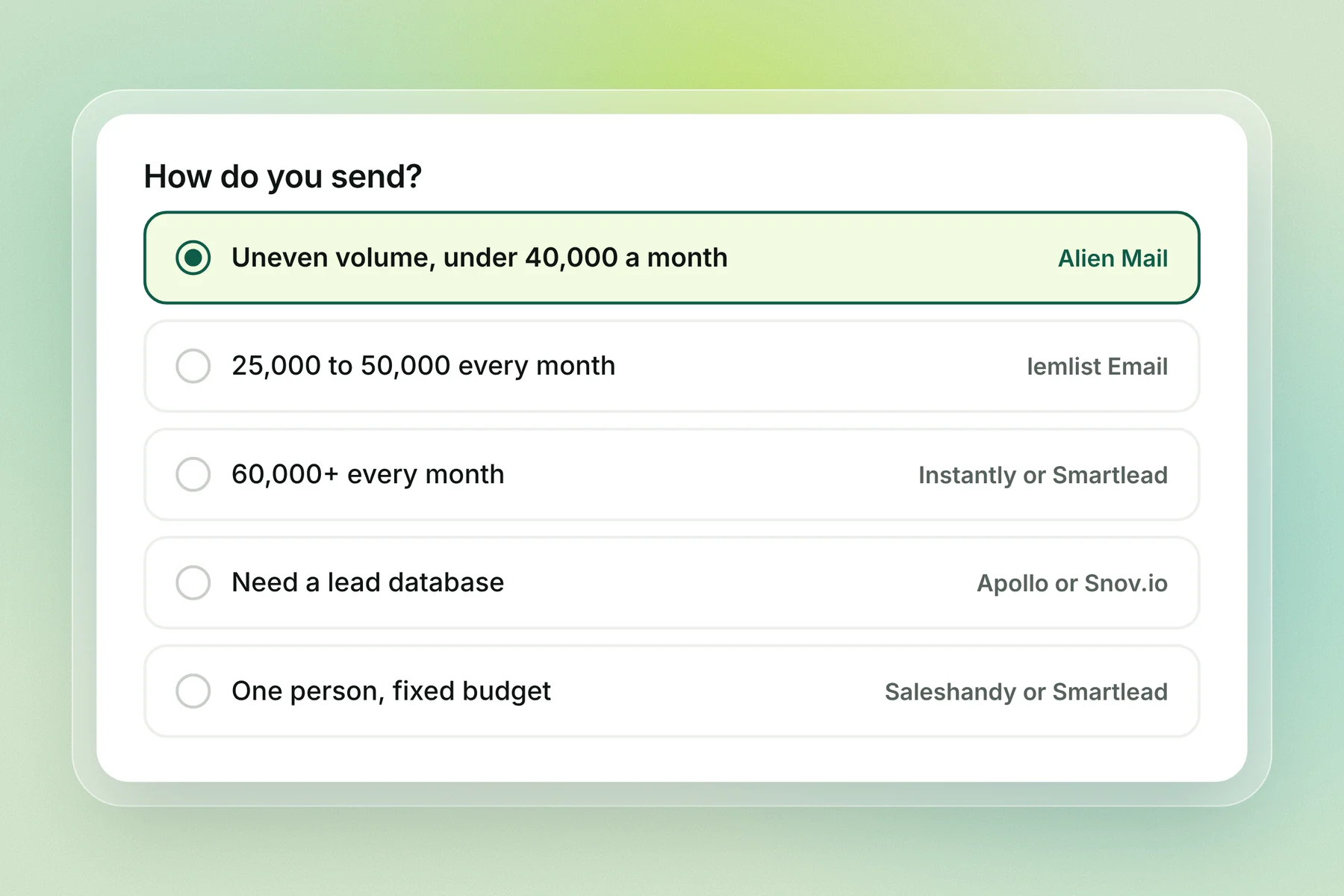
If you... | Pick |
|---|---|
Send unevenly, or under about 40,000 emails a month | Alien Mail |
Send 25,000 to 50,000 every month | lemlist Email |
Send 60,000+ every month | Instantly Hypergrowth or Smartlead Pro |
Run an agency with many clients | Smartlead or QuickMail Agency |
Are one person on a fixed budget | Saleshandy Starter or Smartlead Base |
Need a lead database in the same tool | Apollo or Snov.io |
Want email, calls and LinkedIn together | Reply.io or lemlist Multichannel |
Check what's included and what's an add-on
Feature | What to check |
|---|---|
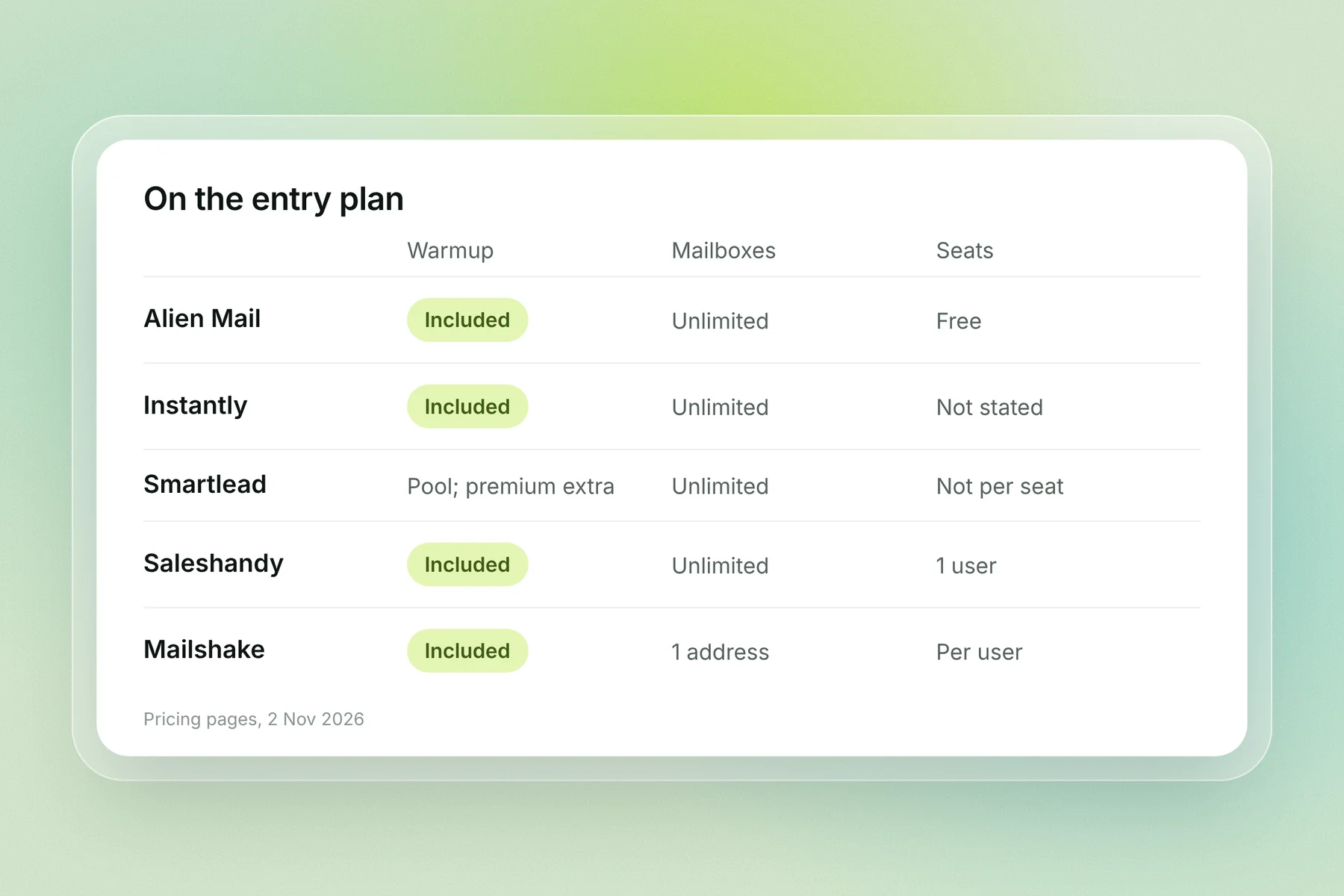
Mailboxes | Unlimited on Smartlead, Saleshandy, QuickMail and Instantly; Mailshake allows 1 to 2 addresses per user on its lower plans |
Warmup | Included on most plans; Smartlead sells premium warmup separately; Snov.io Starter warms 3 mailboxes |
Seats | Saleshandy Starter has 1; QuickMail has unlimited users; Mailshake and Apollo charge per user |
Contacts | Instantly Growth caps uploaded contacts at 1,000; Smartlead Base at 2,000; Reply.io prices by active contacts |
Lead data | Apollo and Snov.io include finder credits; Instantly sells its database separately |
Run a trial that tells you something
Use the trial to send a real, small campaign from a warmed inbox and check three things: whether replies land in one inbox, whether follow-ups stop when someone replies, and what next month would cost at your real volume. Mailshake has no trial, so book a demo or start with one month.
How we compared
We opened each tool's pricing page on 2 Nov 2026 and took the monthly-billing price of the cheapest plan that covers each volume. We counted 5 emails per contact where a plan is priced by contacts. We didn't test deliverability, because results depend on your domain, list and copy more than on the tool. Prices change often, so check the linked pricing page before you buy.
Frequently asked questions
What is the best cold email software? It depends on volume. Alien Mail is cheapest for uneven or low volume (5,000 emails for $12), lemlist Email is best value at 25,000 to 50,000 emails a month ($69), and Instantly suits 60,000+ a month ($97 Hypergrowth).
What is the cheapest cold email software? For 5,000 emails a month, Alien Mail at $12. Among monthly plans, Smartlead Base ($39) and Snov.io Starter ($39) are cheapest, then Saleshandy Starter ($41, or $34 billed yearly).
Is there free cold email software? Apollo has a free plan with no time limit for Gmail accounts. Alien Mail gives 100 free credits and free warmup. Snov.io's free plan includes a one-time 450 warmup emails. Mailshake has no free plan or trial.
Is pay per email cheaper than a monthly plan? Below about 40,000 emails a month, usually yes. Above that, a flat plan wins: lemlist's $69 beats Alien Mail above about 43,000 emails, and Instantly's $97 above about 60,000.
Can I just use Gmail or Outlook for cold email? For a few emails a day, yes. Google Workspace caps each user at 2,000 messages a day, and there's no automatic follow-up or inbox rotation. See our Gmail sending limits guide.
Which cold email software has the best deliverability? No tool can guarantee inbox placement. Deliverability depends mostly on your domain setup, warmup, list quality and sending volume. See our cold email deliverability checklist.
Do I need separate warmup software? Usually not. Every tool on this list except Apollo lists warmup on its pricing page. See best email warmup tools if you want a standalone one.
Key terms
Cold email software: a tool that sends personalised emails and follow-ups to people who haven't heard from you, from your own inboxes.
Pay per email: pricing where you buy credits and pay only for emails sent.
Flat plan: a monthly price for a set number of emails or contacts, charged whether you send or not.
Active contacts: contacts in a running sequence; some tools charge by this instead of by emails.
Inbox rotation: spreading one campaign across several mailboxes so each stays under a safe daily volume.