Google Workspace vs Microsoft 365 for Cold Email: Which Is Better in 2026?
Google Workspace or Microsoft 365 for cold email? Here are the real sending limits, what a mailbox costs on each, and why most teams end up using both.


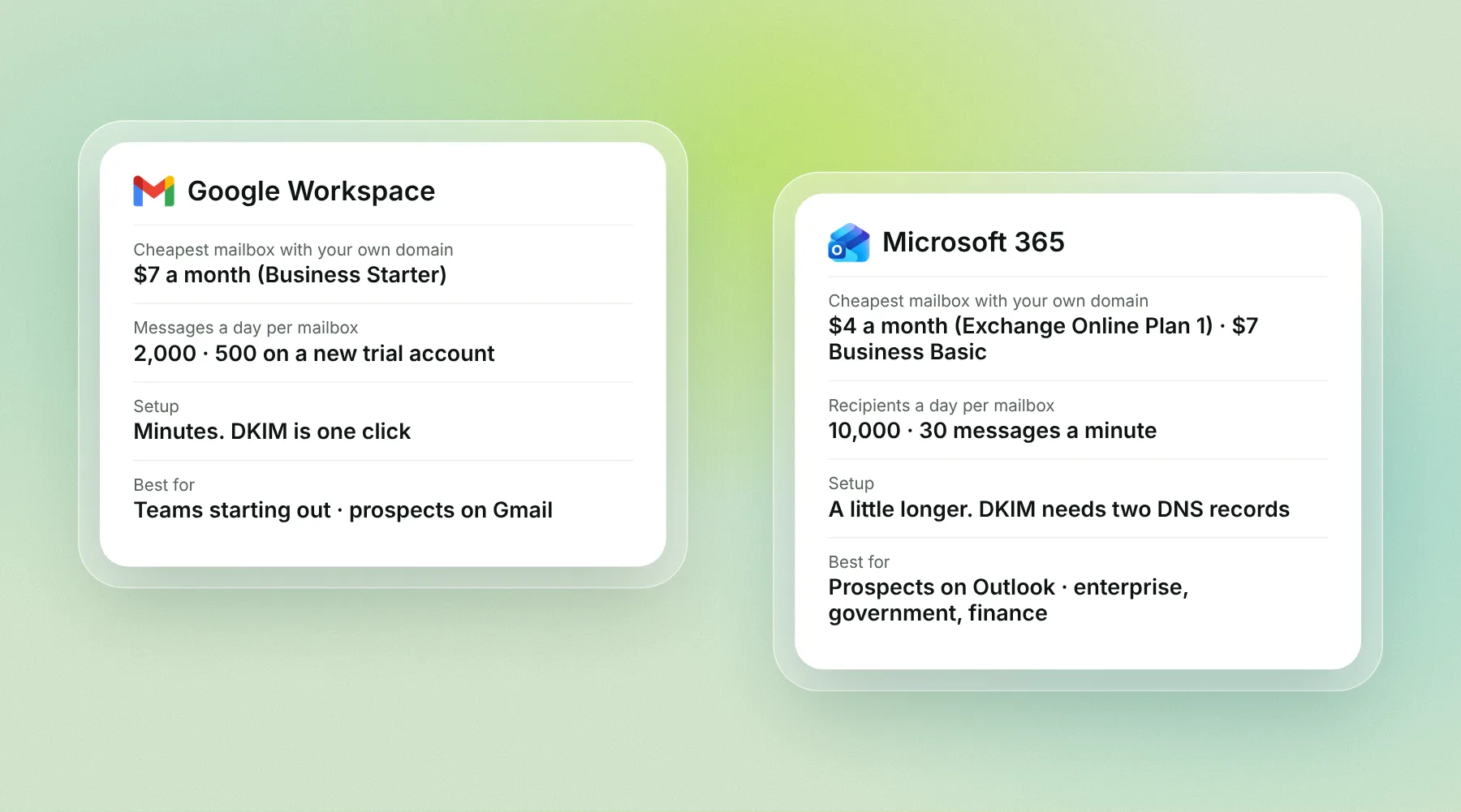
Google Workspace vs Microsoft 365 for cold email comes down to three things: how many emails each mailbox can send, how much a mailbox costs, and where your prospects read their mail. Both work. Most teams end up using both. Here is how they compare in 2026, with every limit and price taken from Google's and Microsoft's own pages.
Disclosure: we make Alienmail, which sells Google and Outlook mailboxes and connects to both. Every limit and price below comes from Google's or Microsoft's own page, checked on 14 November 2026.
The short answer: Google Workspace is the easier start. Setup takes minutes, and most cold email tools connect to it in one click. Microsoft 365 is the better choice when your prospects use Outlook, because mail that stays inside Microsoft's network tends to land more reliably. The cheapest own-domain mailbox is Microsoft's Business Basic without Teams at $5.40 a month, or Exchange Online Plan 1 at $4. Google's cheapest is Business Starter at $7. Alienmail sells both Google and Outlook mailboxes for $3.25 a month with DNS and warmup done for you. Either way, send 30 to 50 cold emails a day per mailbox, not the thousands the provider allows.
The two providers at a glance
Google Workspace | Microsoft 365 | |
|---|---|---|
Cheapest plan with your own domain | Business Starter, $7 a month per user (yearly) | Business Basic, $7 a month per user (yearly); $5.40 without Teams; Exchange Online Plan 1, $4 |
Month-to-month price | $8.40 | $8.40 ($6.48 without Teams) |
Messages a day per mailbox | 2,000 | 10,000 recipients |
New-account limit | 500 a day on trial, until you have paid $100 in total | 5,000 external recipients a day for trial tenants; 100 a day if you send from the free onmicrosoft.com address |
Speed limit | None stated | 30 messages a minute |
Free trial | 14 days | 1 month, card needed |
Setup | Minutes. DKIM is one click in the admin console | A little longer. DKIM needs two DNS records |
Connects to cold email tools | Almost all, by signing in with Google | Almost all, by signing in with Microsoft |
Best for | Most teams starting out | Prospects on Outlook; enterprise, government, finance, legal |
Prices are US list prices per user per month on a yearly plan, from workspace.google.com and microsoft.com, 14 November 2026. Limits from Google's Gmail sending limits page and Microsoft's Exchange Online limits page.
Why the provider's limit is not your limit
Google lets one mailbox send 2,000 messages a day. Microsoft lets one send to 10,000 recipients a day. Neither number matters for cold email.
Cold email goes to people who have not heard from you. If one mailbox sends hundreds of those a day, Gmail and Outlook start putting them in spam, and the mailbox's reputation drops. The number that works is 30 to 50 cold emails a day per mailbox, after two to three weeks of warmup.
So the real question is not "which provider lets me send more". It is "how many mailboxes do I need, what does each cost, and where will they land".
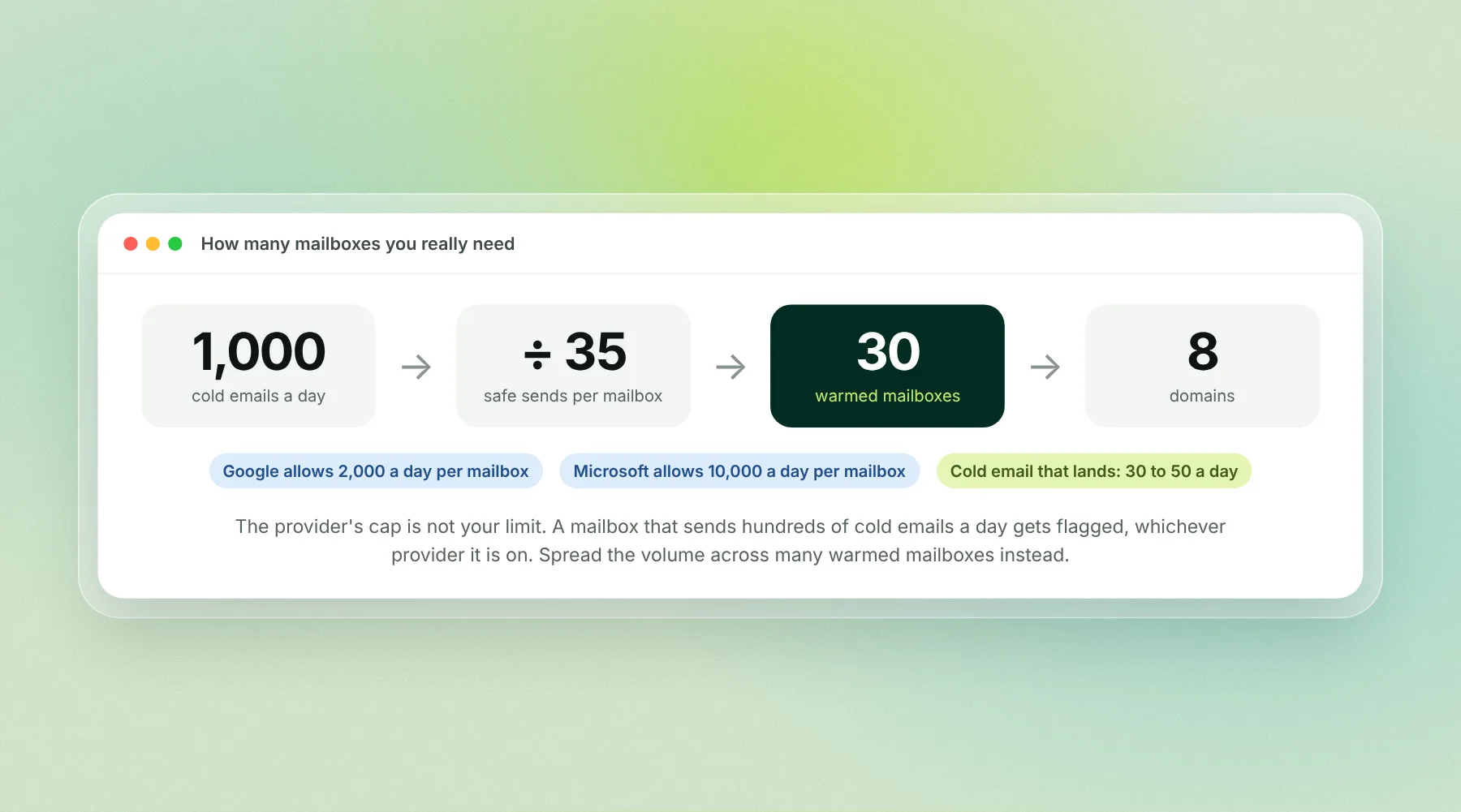
For 1,000 cold emails a day you need about 25 to 35 mailboxes, spread across 5 to 10 domains, on either provider.
Google Workspace for cold email
Best for: teams starting out, and anyone whose prospects mostly use Gmail.
Google Workspace is the default for most cold email teams. You buy a domain, open a Workspace account, add a mailbox, and turn on DKIM from the admin console. Most cold email tools connect by signing in with Google, with no passwords to store.
Price: Business Starter is $7 a month per mailbox on a yearly plan, or $8.40 month to month. It includes 30 GB of storage, which you will never fill with cold email.
Limits: 2,000 messages a day per mailbox, with 2,000 recipients a day outside your own domain.
Watch out for: new accounts start on trial limits of 500 messages a day. Google lifts them once your domain has paid at least $100 in total, and says that can take up to 75 days. On a $7 mailbox, that is a long wait. The trial limit is still far above the 30 to 50 a day you should send, so for cold email it rarely bites.
Also: Google treats mail to more than 5,000 Gmail addresses a day as bulk and requires SPF, DKIM, DMARC, one-click unsubscribe and a spam rate under 0.3%. Set up all three records from day one.
Our Gmail sending limits guide has every Workspace cap and the safe daily numbers.
Microsoft 365 for cold email
Best for: prospects who read mail in Outlook: enterprise, government, finance, legal, healthcare and most large companies.
Microsoft 365 is the stronger choice when your buyers run on Outlook. Mail from a Microsoft mailbox to a Microsoft inbox never leaves Microsoft's network, and many senders find it lands more reliably than mail coming in from Google.
Price: Business Basic is $7 a month per mailbox on a yearly plan, or $8.40 month to month. Without Teams it is $5.40 ($6.48 month to month). If you only want a mailbox, Exchange Online Plan 1 is $4 a month per user on a yearly plan, with a 50 GB mailbox.
Limits: 10,000 recipients a day per mailbox, 30 messages a minute, and up to 1,000 recipients on one message. Your whole account also has a daily cap on outside recipients that grows with the number of licences you buy; trial accounts get 5,000 a day.
Watch out for: never send from the free yourcompany.onmicrosoft.com address. Microsoft caps it at 100 outside recipients a day for the whole organisation. Add your own domain and send from that.
Also: since May 2025, Microsoft requires SPF, DKIM and DMARC from anyone sending more than 5,000 emails a day to Outlook, Hotmail and Live addresses. Mail that fails goes to junk.
Setup takes a little longer than Google. DKIM needs two CNAME records, and you have to enable it in the Microsoft 365 Defender portal. Our Outlook and Microsoft 365 bulk sender rules post walks through it.
What a cold email setup costs on each
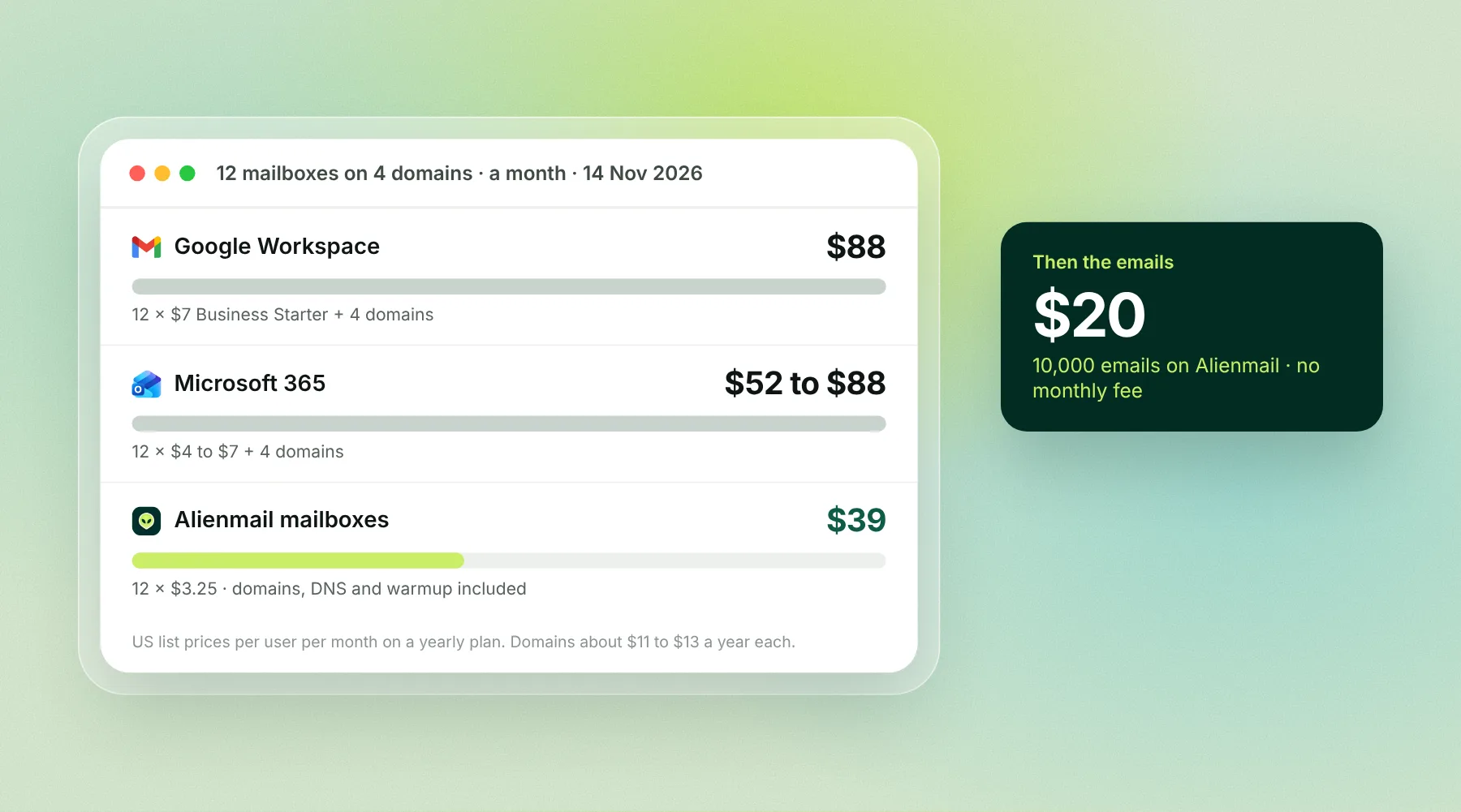
Example: 12 mailboxes on 4 domains, sending 30 cold emails a day each (about 7,900 a month on working days).
Line | Google Workspace | Microsoft 365 | Alienmail mailboxes |
|---|---|---|---|
12 mailboxes | $84 (Business Starter, $7 each) | $84 (Business Basic, $7 each); $64.80 without Teams; $48 on Exchange Online Plan 1 | $39 ($3.25 each) |
4 domains | about $4 a month | about $4 a month | Included |
DNS setup (SPF, DKIM, DMARC) | You do it | You do it | Done for you |
Warmup | Your cold email tool | Your cold email tool | Included, free |
Mailboxes a month | about $88 | about $52 to $88 | $39 |
Domains at about $11 to $13 a year each for a .com. Alienmail mailboxes are Google or Outlook mailboxes set up on separate domains, with DNS and warmup included; see mailboxes.
The mailboxes are the biggest line in a cold email budget. On Alienmail, the emails themselves are small by comparison: 5,000 cost $10 and 10,000 cost $20, with no monthly fee.
Private SMTP: cheaper, but you carry the risk
Some teams run their own mail server or buy SMTP mailboxes from a reseller for $1 to $3 a month. The trade-off is reputation.
Shared reseller IPs carry whatever the other customers did on them. One bad neighbour hurts everyone.
A dedicated IP starts with no reputation and needs weeks of careful warmup and steady volume.
You own the setup: reverse DNS, TLS, blocklist checks and feedback loops are your job.
Private SMTP is not wrong, but it is rarely the best start. Prove your targeting and copy on Google or Microsoft mailboxes first.
The setup most teams end up with: both
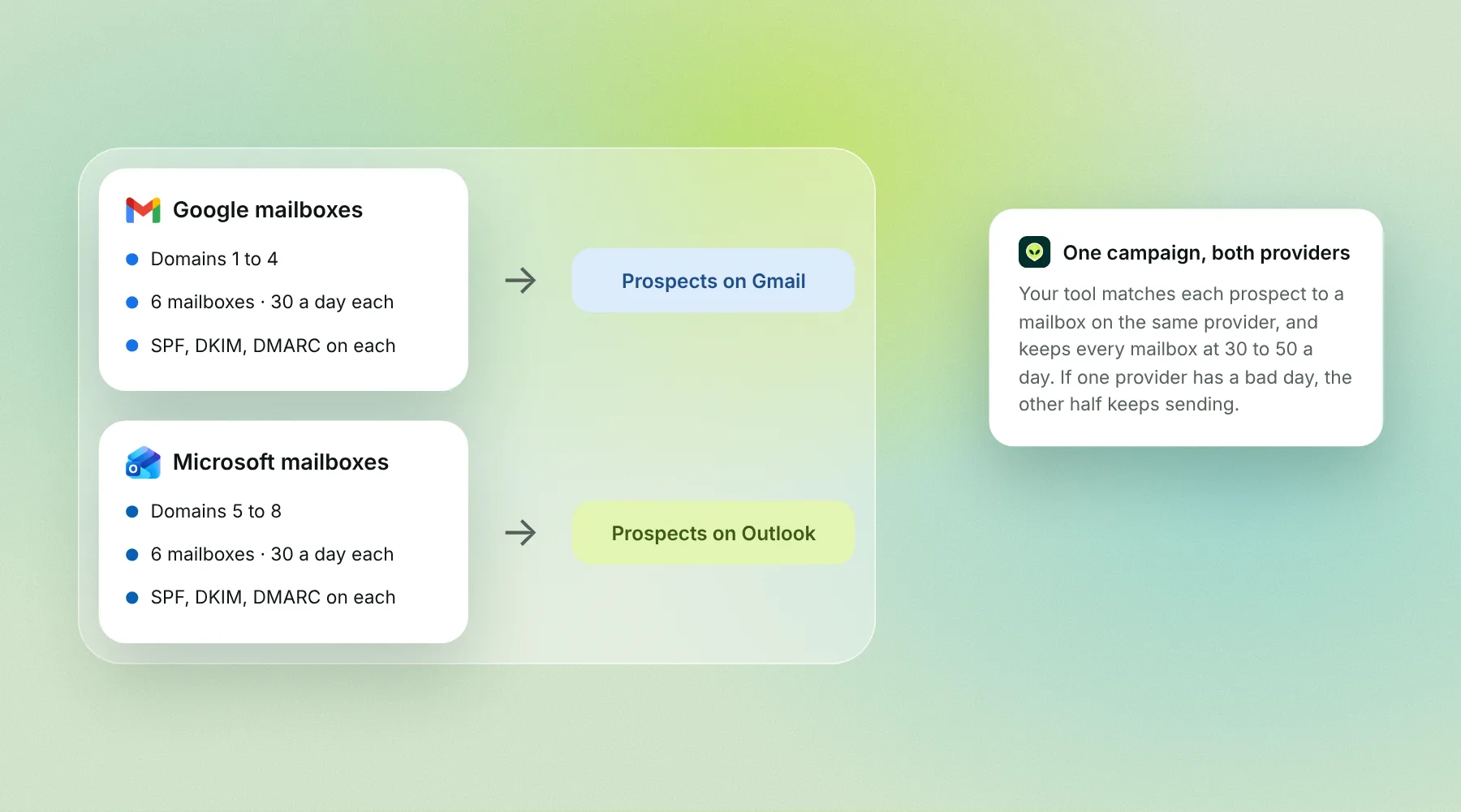
Many teams split their mailboxes between Google and Microsoft. Two reasons:
Matching. Google mailboxes send to prospects on Gmail. Microsoft mailboxes send to prospects on Outlook. Mail that stays inside one provider's network tends to land better.
Backup. If one provider has a bad day, or flags one of your domains, the other half keeps sending.
How to do it:
Buy four or more secondary domains. Never send cold email from your main domain.
Put Google mailboxes on half of them and Microsoft mailboxes on the other half.
Add SPF, DKIM and DMARC on every domain.
Warm up every mailbox for two to three weeks.
Send 30 to 50 cold emails a day per mailbox, and let your tool spread each campaign across all of them.
Connecting mailboxes to your cold email tool
There are two ways to connect:
Sign in with Google or Microsoft. You log in and grant access. The tool never stores your password. This is the cleanest option for Workspace and Microsoft 365.
SMTP and IMAP. You enter the server address and a password or app password. This works with any provider, including private SMTP, but you have to look after the credentials.
Either way, the tool needs to read the inbox as well as send, so it can spot replies and run warmup. Some company admins block third-party apps by default, so check the Workspace or Microsoft 365 admin settings if a connection fails.
Alienmail connects Google Workspace, Microsoft 365 and SMTP mailboxes with no limit on how many, and warmup is free on every one. If you would rather not set up mailboxes yourself, Alienmail sells Google and Outlook mailboxes at $3.25 a month with DNS and warmup done for you. Start free with 25 emails, no card needed.
Bottom line
Start with Google Workspace if your prospects are a mix. Start with Microsoft 365 if they run on Outlook. Once you send more than a few hundred cold emails a day, use both, on separate domains, and keep every mailbox at 30 to 50 a day. If you would rather skip the setup, Alienmail sells both kinds of mailbox for $3.25 a month, with the domain, DNS and warmup done for you.
Frequently asked questions
Is Google Workspace or Microsoft 365 better for cold email? Both work. Google Workspace is quicker to set up and connects to almost every tool. Microsoft 365 tends to land better with prospects on Outlook. Many teams use both and match the provider to the prospect.
How much does a Google Workspace mailbox cost for cold email? Business Starter is $7 a month per mailbox on a yearly plan, or $8.40 month to month (14 November 2026).
How much does a Microsoft 365 mailbox cost for cold email? Business Basic is $7 a month per mailbox on a yearly plan, $5.40 without Teams. Exchange Online Plan 1, which is only the mailbox, is $4 a month.
How many cold emails can I send a day from Google Workspace? Google allows 2,000 messages a day per mailbox (500 on a new trial account). For cold email, keep it to 30 to 50 a day per mailbox so your emails land in the inbox.
How many cold emails can I send a day from Microsoft 365? Microsoft allows 10,000 recipients a day per mailbox and 30 messages a minute. The same 30 to 50 a day rule applies.
Can I use a free Gmail or Outlook.com account for cold email? No. Free accounts have no domain of your own, so you cannot set up SPF, DKIM and DMARC, and they look unprofessional to business buyers.
Why does the onmicrosoft.com address only send 100 emails? Microsoft caps the free yourcompany.onmicrosoft.com domain at 100 outside recipients a day for the whole organisation. Add your own domain and send from that.
Does it matter which provider my prospects use? It can. Mail that stays inside one provider, such as Microsoft to Microsoft, often lands more reliably. That is why many teams run both and match them to each prospect.
Is private SMTP cheaper for cold email? Per mailbox, often yes. But you take on IP reputation, reverse DNS and blocklist monitoring yourself, and a shared IP can be hurt by other customers.
How many mailboxes do I need? Divide your daily target by about 35. For 1,000 cold emails a day, plan on roughly 30 warmed mailboxes across 6 to 10 domains.
How can Alienmail sell Google and Microsoft mailboxes for less than Google and Microsoft charge? Alienmail mailboxes are $3.25 a month, against $7 for Business Starter or Business Basic. They are real Google and Outlook mailboxes, set up by Alienmail in bulk on domains it manages, and used only for sending cold email. You get the mailbox, the domain, SPF, DKIM and DMARC and free warmup for one price, with no storage, apps or seats you would never use. See mailboxes for details.
Key terms
Mailbox: one email address that can send and receive. Cold email tools spread a campaign across many of them.
Secondary domain: a domain you buy just for cold email, so your main domain's reputation is safe.
Warmup: two to three weeks of slow, friendly sending so a new mailbox builds a good reputation before it sends cold email.
SPF, DKIM and DMARC: three DNS records that prove your email really came from your domain. Google and Microsoft both require them.
Trial limit: the lower sending cap Google puts on a new account until it has paid $100 in total.
Related reading
How we compared
We read Google's Gmail sending limits page, Microsoft's Exchange Online limits page, workspace.google.com/pricing and microsoft.com's Business Basic, Business Standard and Exchange Online pages on 14 November 2026. Prices are US list prices per user per month. We did not run a deliverability test; the "lands better inside one provider" point is what most cold email teams report, not a measured result. Prices and limits change, so check the provider's page before you buy.