Gmail Sending Limits: Workspace, Free Gmail and Cold Email
Google allows 2,000 emails a day per Workspace user. Cold email should use about 2% of that. Here are the official numbers and the ones that actually keep you out of spam.
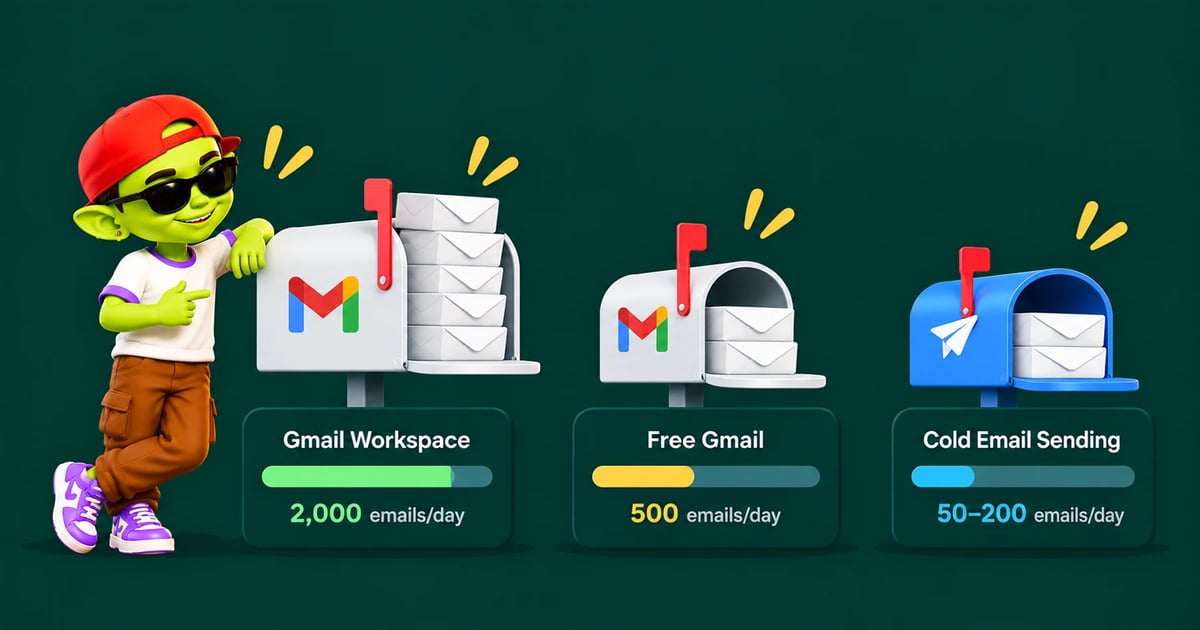

Gmail sending limits are the caps Google puts on how many emails one account can send in a rolling 24-hour window. A paid Google Workspace user can send up to 2,000 messages a day. A free Gmail account can send about 500. Those are the technical ceilings. For cold email, the safe number is far lower, and knowing the difference is what protects your domain.
The official Gmail sending limits
Google publishes these limits in its Workspace admin help center. They apply per user, over a rolling 24 hours, not a calendar day.
Limit | Google Workspace (paid) | Workspace trial | Free Gmail |
|---|---|---|---|
Messages per day | 2,000 | 500 | 500 |
Recipients per message | 2,000 total, max 500 external | — | 500 |
Total recipients per day | 10,000 | — | — |
External recipients per day | 3,000 | — | — |
Unique external recipients per day | 2,000 | 500 | — |
Recipients per message via SMTP (POP/IMAP users) | 100 | — | — |
A dash means Google doesn't publish a separate figure for that account type. Two details matter here. First, mail merge sends are capped lower, at 1,500 a day. Second, a new Workspace account stays on trial limits until the domain has paid at least $100 in total. Google says that step can take up to 75 days.
What happens when you hit the limit
You see an error such as "You reached a Gmail sending limit." Sending stops for up to 24 hours. You can still receive mail and use other Google apps. Sending resumes on its own once the rolling window clears.
A single lockout is not a disaster. Repeated lockouts are. Google says repeated overages can lead to account suspension. And long before you hit 2,000 a day, Gmail's spam filters will have noticed the pattern.
Why the real cold email limit is 30–50 a day
The 2,000 cap tells you what Google will physically let through. It says nothing about where those emails land. Inbox placement depends on how your sending looks. Volume is one of the loudest signals.
A real salesperson sends a few dozen external emails a day. A mailbox sending 400 cold emails a day does not look like a person. It looks like a bulk sender using a personal inbox. Spam filters treat it that way.
That is why most deliverability teams cap cold email at roughly 30–50 sends per inbox per day. That figure includes follow-ups. New inboxes start much lower and ramp up over several weeks. Our 30-day warm-up schedule shows the exact curve.
Inbox stage | Safe cold sends per day | Warm-up emails per day |
|---|---|---|
Week 1–2 (new) | 0 | 3–10 |
Week 3–4 | 10–25 | 15–30 |
Established (1+ month) | 30–50 | 25–30, ongoing |
Google's bulk sender rules still apply
Since February 2024, Google has had extra rules for anyone sending more than 5,000 messages a day to Gmail addresses. Those senders must have SPF, DKIM and DMARC set up. They must keep the spam rate in Postmaster Tools below 0.3%. Marketing mail must support one-click unsubscribe. You can read the full list in Google's sender guidelines.
The 5,000 threshold counts across your whole domain, not per inbox. Ten inboxes on one domain sending 500 each puts you over it. Even under the threshold, the all-sender rules apply: SPF or DKIM, valid PTR records, TLS, and a spam rate under 0.3%. Our SPF, DKIM and DMARC guide covers the setup.
How to send more without breaking the limit
If you need 1,000 cold emails a day, do not push one inbox harder. Add inboxes instead. The math is simple:
Pick a safe per-inbox number. Use 30–40 a day once warmed.
Divide your target by it. 1,000 ÷ 35 is about 29 inboxes.
Spread inboxes across several domains. If one domain has a problem, the others keep sending.
Rotate sends across inboxes. Each mailbox stays well under the cap. Your total volume still adds up.
Keep warm-up running. It continues in the background on every inbox, even during campaigns.
Spreading volume this way is the safest pattern. It also adds cost if your tool charges per inbox. AlienMail charges per email sent instead, so connecting 30 inboxes costs the same as connecting three. Inbox rotation and free warm-up run on every mailbox you connect.
Gmail vs Microsoft 365 limits
If you also use Microsoft 365 inboxes, the caps look different. Exchange Online allows 10,000 recipients a day per mailbox and 30 messages a minute. Microsoft also applies a tenant-wide limit on external recipients. The practical cold email ceiling is the same: 30–50 per inbox. Our Outlook bulk sender guide covers Microsoft's side in detail.
Bottom line
Google lets a Workspace user send 2,000 emails a day. Cold email should use a small slice of that. Keep each inbox at 30–50 sends a day, warm new inboxes first, and add inboxes to scale. If you want to see how inbox health holds up as you grow, AlienMail's deliverability monitoring tracks placement and spam rate for every mailbox.
Related guides: cold emails going to spam in Gmail, cold email infrastructure cost, secondary domains for cold email and domain health check.
Frequently asked questions
How many emails can I send per day with Gmail?
A free Gmail account can send about 500 emails a day. A paid Google Workspace account can send up to 2,000 a day, or 1,500 with mail merge. Workspace trial accounts are limited to 500.
Does the Gmail sending limit reset at midnight?
No. Limits work on a rolling 24-hour window. If you hit the limit at 3pm, you can send again once messages from before 3pm the previous day drop out of the count, usually within 24 hours.
How many cold emails should I send per inbox per day?
About 30–50 for a fully warmed inbox, including follow-ups. Brand-new inboxes should send only warm-up emails for the first one to two weeks.
Do warm-up emails count toward the Gmail limit?
Yes. Every message sent from the account counts. Warm-up volume of 25–30 a day plus 30–50 cold emails still keeps you far below 2,000.
Can I raise my Google Workspace sending limit?
No. Google does not raise per-user limits on request. To send more, add users or inboxes and spread the volume across them.
More from the blog
Your next campaign is six minutes away
Connect your business and let Alien AI handle the writing, structuring, and optimizing.
Generate my Business DNA — free