Which Cold Email Software Is Best for Beginners? 7 Tools Compared (2026)
Which cold email software is best for beginners? 7 tools scored on free start, built-in warmup, AI writing and price, plus a 5-step first campaign that lands in the inbox.


The best cold email software for beginners is the one that handles the setup you don't know yet: warming up your inbox, capping your daily sends, checking your list and writing a first sequence that doesn't read like spam.
Disclosure: we make Alienmail, which is on this list. Every price below comes from the tool's own pricing page.
The short answer: For most beginners, Alienmail: it writes your sequence from your website, warms every inbox for free, verifies your list and costs $5 to start (5,000 emails for $12), with no plan to pick. If you'd rather learn the manual way on a classic campaign tool, Woodpecker ($39, 14-day trial, bounce protection) is the easiest to read, and Instantly ($47) has the most tutorials. Skip Gmail add-ons such as Mailmeteor for cold email: no warmup, one inbox, and Gmail's limits.
First campaigns rarely fail because of the tool. They fail because the inbox wasn't warmed, the list had 8% bad addresses, or 300 emails went out from one Gmail account on day one. So this guide scores each tool on how much of that it does for you, then on price.
What a beginner needs from cold email software
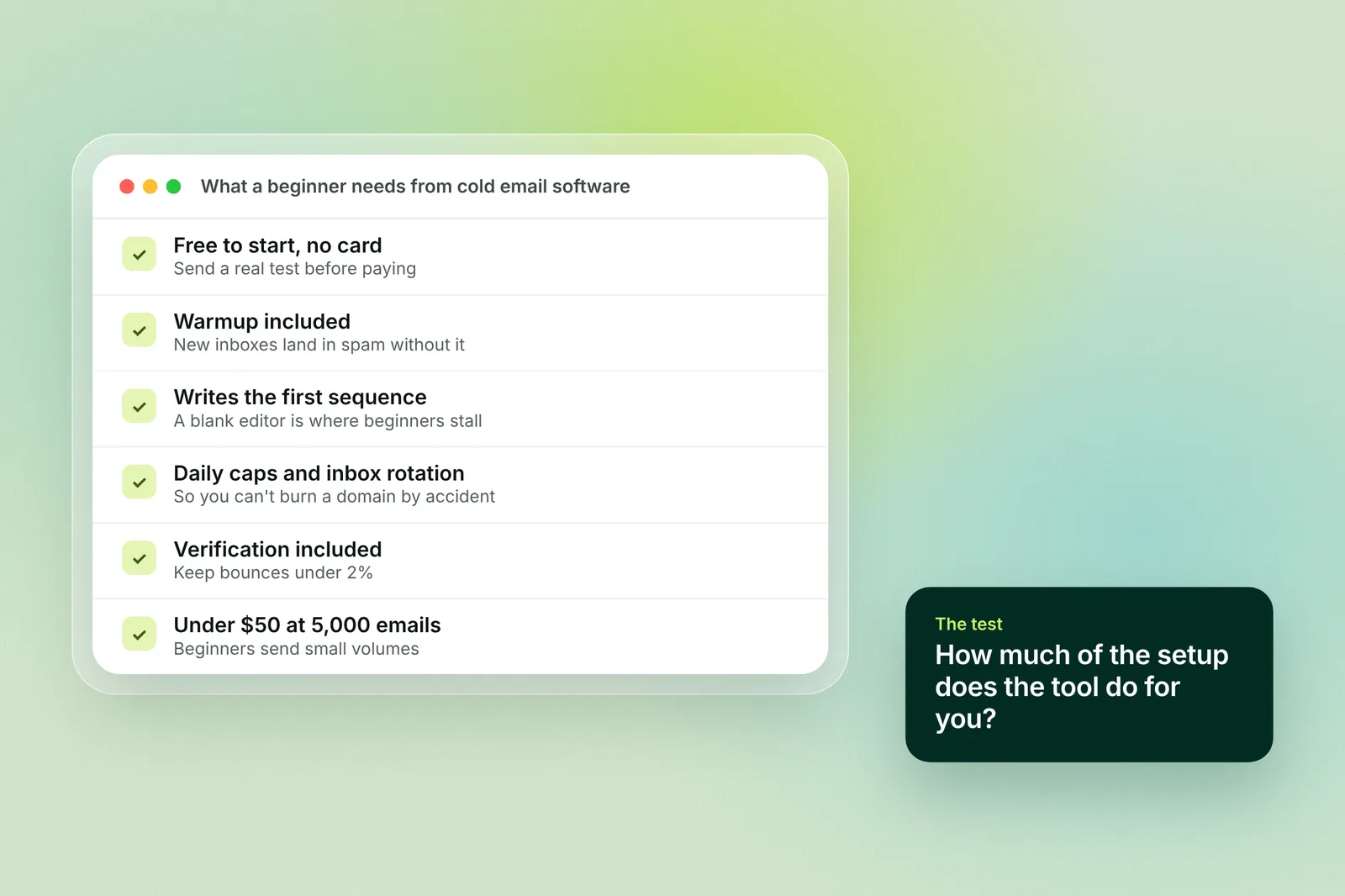
A free start without a card. Send a real 25-email test before you pay anything.
Warmup included. New inboxes and domains land in spam without it, and paid warmup is the first thing beginners skip.
Help writing the first sequence. A blank editor is where most people stall. A tool that drafts from your website gets you to a sendable first version in minutes.
Sending limits built in. Daily caps per inbox (we recommend about 30 cold emails a day) and rotation across inboxes, so you can't burn a domain by accident.
Verification included. A bounce rate above 2% damages a new domain quickly.
Under $50 a month at 5,000 emails. Beginners send small volumes; don't pay for 50,000.
The 7 best cold email tools for beginners
1. Alienmail: does the setup for you, from $5
Best for: founders and small teams sending their first 1,000 to 10,000 emails who want the tool to handle warmup, writing and limits.
Alienmail starts from your website. Paste the URL, and the AI writes a sequence in your voice, suggests who to target, and sends from inboxes it has warmed for you. There is no plan to choose: each email costs 4 credits, the first top-up is $5 (1,250 emails), 5,000 emails cost $12, and credits last 12 months.
Free start: 100 credits on signup, no card.
Warmup: free on every inbox you connect, with no time limit.
Writing: AI drafts the whole sequence from your site; you edit.
Limits and verification: per-inbox daily caps, rotation, and list verification included. Extra mailboxes $2.50 each.
Watch out for: it's opinionated. If you want to hand-build every step from a blank editor, a classic campaign tool may suit you better.
Start free with 100 credits · See pricing
2. Woodpecker: the clearest classic campaign tool, $39
Best for: beginners who want to learn the manual way on a tool that explains itself.
Woodpecker's campaign builder is the easiest to read of the classic tools, and its trial is generous: 14 days or 500 cold emails, no card. The Email plan is $39 a month for 5,000 emails with unlimited email accounts and 3 warmups included, and its bounce protection stops a bad list before it hurts your domain.
Watch out for: $39 for 5,000 emails is three times Alienmail's price for the same volume, and warmup beyond 3 inboxes costs extra.
3. Instantly: the most tutorials, $47
Best for: beginners who learn from YouTube and want the tool everyone makes videos about.
Instantly's Growth plan is $47 a month ($37.60 billed yearly) for 5,000 emails and 1,000 uploaded contacts, with unlimited email accounts and unlimited warmup. You can start free with no card. The community and tutorial library are the largest in cold email, which matters when you're stuck at 11pm.
Watch out for: 1,000 contacts fills fast, verification is an add-on, and the interface has grown a lot of panels.
4. SalesBlink: $29 for 10,000 emails with warmup
Best for: budget-conscious beginners on a monthly plan.
SalesBlink Starter is $29 a month ($25 billed yearly) for 10,000 emails, unlimited email accounts, unlimited warmup and AI-written sequences, with a 14-day trial and no card.
Watch out for: the next plan is $99, and list verification isn't listed on Starter.
5. Smartlead: cheap and powerful, steeper to learn
Best for: beginners who already know they'll scale to many inboxes.
Smartlead Base is $39 a month ($32 billed yearly) for 6,000 emails and 2,000 active leads, with unlimited email accounts, 2,000 verified emails a month and a free trial with no card. It's built for agencies, so there is more to configure than a first campaign needs.
Watch out for: premium warmup is listed on the Unlimited plans ($174 and up), not on Base.
6. Mailmeteor: the easiest, but not for cold email
Best for: sending a short, personal batch from Gmail to people who already know you.
Mailmeteor lives inside Gmail and Google Sheets, so there is nothing to learn. Starter is $5.99 per user for 5,000 emails a month, capped at 250 a day, and there's a free plan. But there's no warmup, no inbox rotation and no verification, and everything goes out from one Gmail account under Gmail's sending limits. Use it for warm follow-ups, not cold outreach.
7. Mailshake: good onboarding, no trial
Best for: teams that want hand-holding and will pay up front.
Mailshake Starter is $29 per user a month ($25 billed yearly) for 1,500 sends from one inbox, with unlimited warmup and unlimited verification, plus concierge onboarding and deliverability training. There is no free trial; you pay up front.
Watch out for: 1,500 sends and one inbox per user is tight, and the per-user model multiplies with your team.
Beginner cold email tools compared
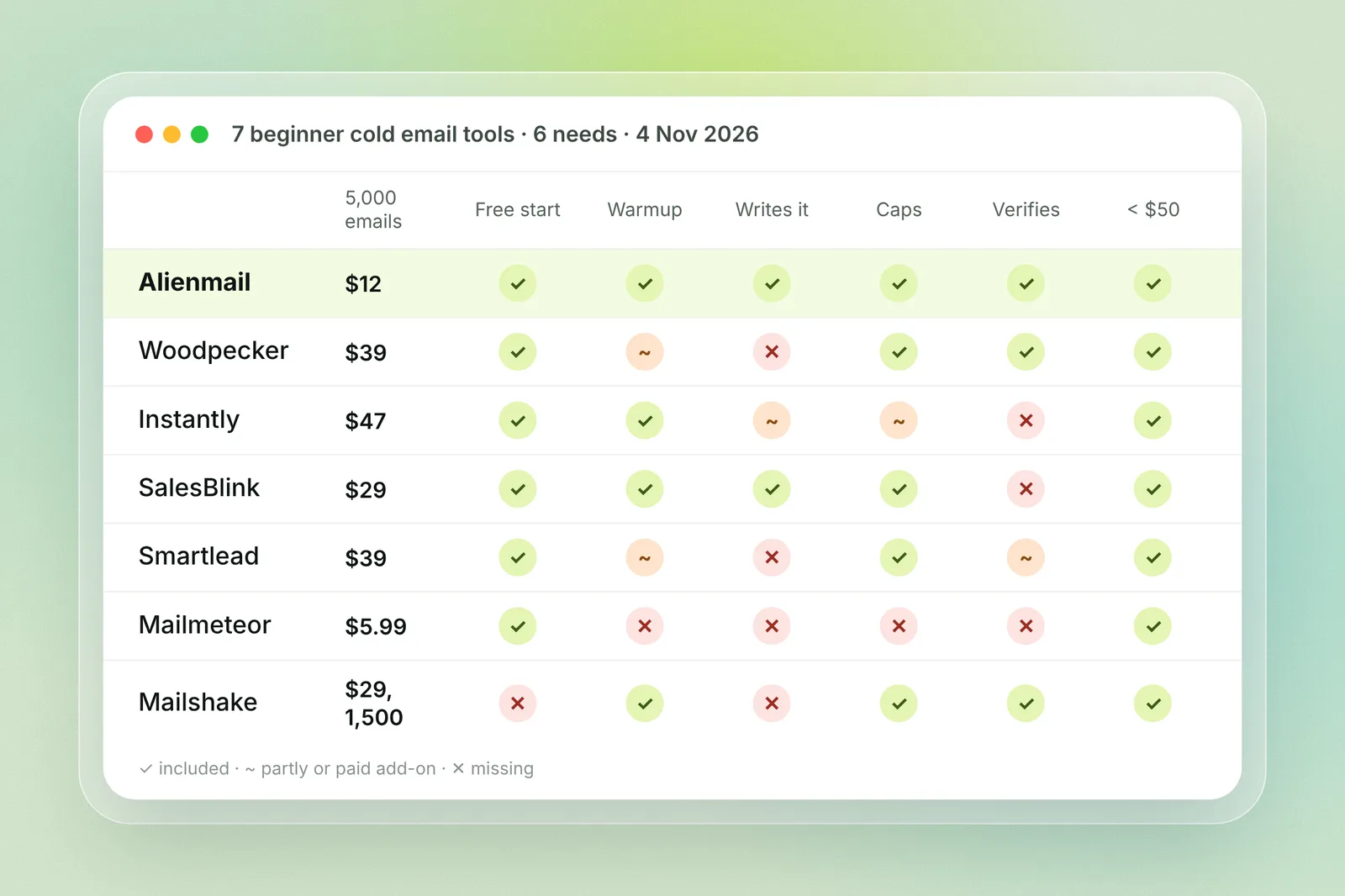
Tool | Price for ~5,000 emails | Free start | Warmup | Writes your sequence | Verification | Beginner fit |
|---|---|---|---|---|---|---|
Alienmail | $12 (pay per email) | 100 credits, no card | Free, unlimited | Yes, from your website | Included | Does the setup for you |
Woodpecker | $39 | 14 days or 500 emails | 3 inboxes | Templates | Included | Clearest manual tool |
Instantly | $47 ($37.60 yearly) | Yes, no card | Unlimited | AI assist | Add-on | Most tutorials |
SalesBlink | $29 (10,000) | 14-day trial | Unlimited | AI sequences | Not listed | Cheapest plan |
Smartlead | $39 ($32 yearly) | Free trial | Premium on higher plans | No | 2,000 a month | Built to scale |
Mailmeteor | $5.99 per user | Free plan | None | No | Add-on | Gmail batches only |
Mailshake | $29 per user (1,500 sends) | No trial | Unlimited | Templates | Unlimited | Guided, but paid up front |
Monthly billing unless stated. Checked 4 Nov 2026 on each tool's pricing page.
Your first cold email campaign in 5 steps
Whichever tool you pick, the first campaign looks the same. Budget three weeks: most of it is waiting for warmup.
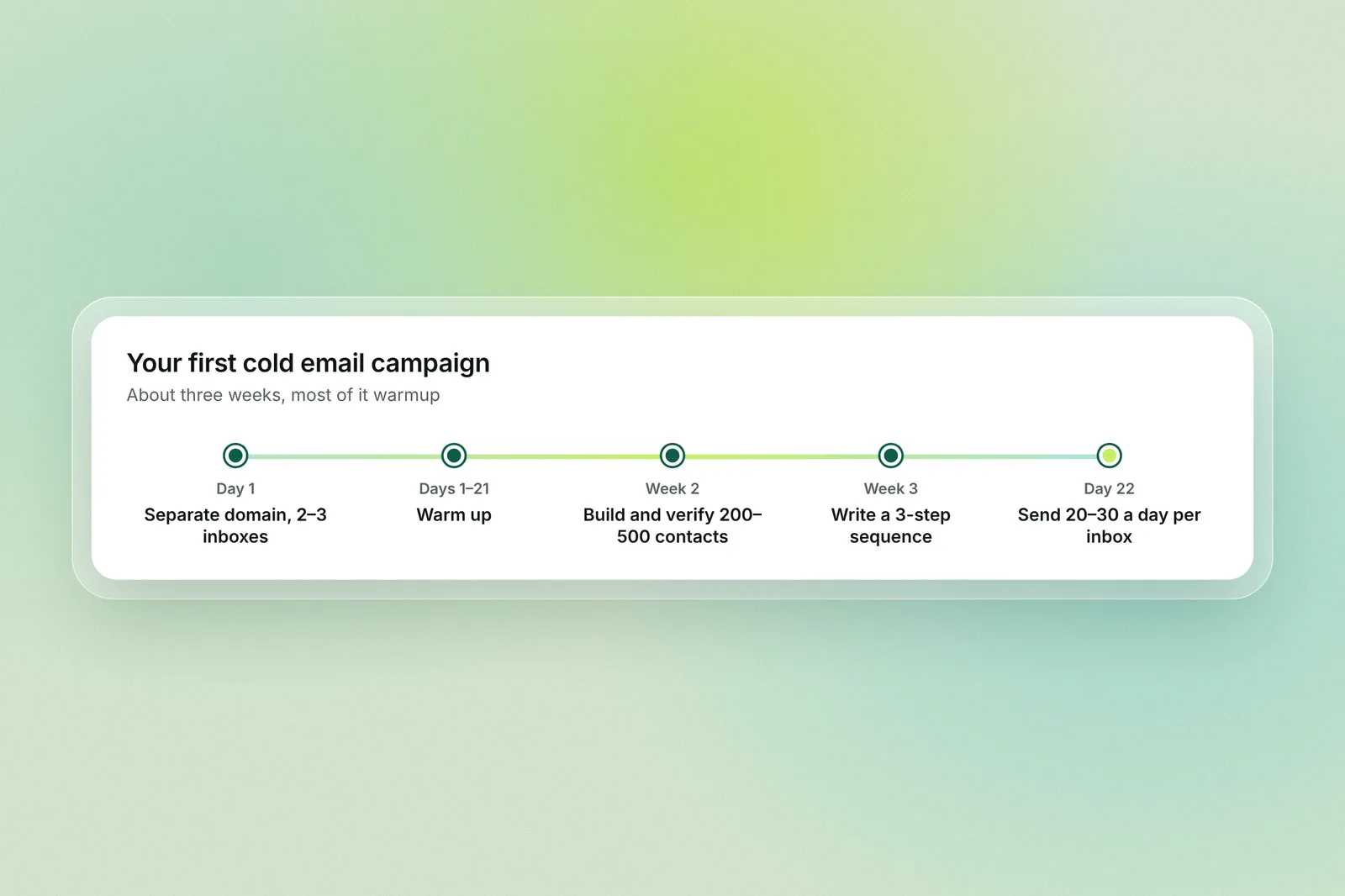
Set up a separate domain and 2 to 3 inboxes. Never send cold email from your main domain. Buy a lookalike domain, add SPF, DKIM and DMARC, and create 2 or 3 inboxes. On Alienmail, mailboxes are $2.50 each and come set up.
Warm up for 2 to 3 weeks. Turn on warmup the day you create the inboxes and don't send a cold email until it has run. What email warmup is explains why.
Build and verify a small list. 200 to 500 contacts who match one clear profile. Verify every address; bounces above 2% hurt a new domain.
Write a 3-step sequence. One short email with a specific reason for reaching out, two follow-ups 3 and 7 days later. Steal structure, not words, from cold email templates. On Alienmail, the AI drafts this from your website.
Send 20 to 30 a day per inbox and read every reply. Start low, watch bounces and replies for a week, then add inboxes rather than volume.
Mistakes beginners make with cold email tools
Sending from the main domain. One spam flag follows your real email forever.
Skipping warmup to save a week. The week you save costs you the domain.
Buying a 10,000-contact list. Bounces and spam traps; 300 good contacts beat 10,000 bad ones.
Choosing a tool by its feature list. You will use five features in month one. Pick the tool that does the setup, then grow.
Paying for 50,000 emails a month. Most beginners send under 5,000. See the cheapest cold email software comparison.
Frequently asked questions
Which cold email software is best for beginners? Alienmail, for most people: it writes the sequence from your website, warms inboxes for free, verifies your list and starts at $5 with no plan. Woodpecker is the easiest classic campaign tool to learn ($39, 14-day trial), and Instantly has the most tutorials ($47).
What is the easiest cold email tool to use? Mailmeteor, because it runs inside Gmail, but it isn't built for cold email: no warmup, no rotation and one inbox. Among real cold email tools, Alienmail asks for the least setup, then Woodpecker.
Is there free cold email software for beginners? Alienmail gives 100 free credits (25 emails) with free warmup and no card; Instantly, Smartlead, SalesBlink and Woodpecker have free trials with no card; Mailmeteor has a free plan. None of the free options replaces a paid plan for a full campaign.
How much should a beginner spend on cold email software? $5 to $40 a month covers 5,000 emails on every tool here except Mailshake. The bigger costs are domains (about $1 a month each) and mailboxes ($2.50 to $7 each).
Can I use Gmail for cold email? For a handful of emails to people who know you, yes. For cold outreach, no: Gmail's limits, no warmup, and one spam complaint can affect your main account. Use a separate domain and a cold email tool.
How many cold emails should a beginner send a day? 20 to 30 per inbox after warmup, from 2 or 3 inboxes. Add inboxes, not volume, as replies come in.
Do I need warmup if I'm only sending 50 emails a day? Yes, if the inbox or domain is new. Warmup builds a sending history before the first cold email; without it, even 20 a day can land in spam.
Key terms
Warmup: automated, friendly email exchanges that build a new inbox's reputation before you send cold email.
Inbox rotation: spreading one campaign across several inboxes so each stays under a safe daily cap.
Sequence: the first email plus its follow-ups, sent automatically until someone replies.
Verification: checking that an address exists before you send, to keep bounces under 2%.
Secondary domain: a lookalike domain used for cold email so your main domain's reputation is never at risk.
Related reading
How we compared
We opened each tool's pricing page on 4 Nov 2026 and took the entry plan on monthly billing, noting yearly prices where shown. Beginner fit is our judgment against the six needs above: free start, warmup, writing help, sending limits, verification and price at 5,000 emails. We didn't run deliverability tests; this is a setup and price comparison. Prices change, so check the tool's pricing page before you buy.